
Native macOS app
Tiny and lightning fast
Built with AppKit and Swift from the ground up — no Electron, no web views. Itsyhome uses virtually no CPU or memory while idle and launches instantly. It’s a true macOS citizen that feels right at home next to your other menu bar apps.
AppKit · Swift · Near-Zero Resources
Batch control
Accessory groups
Control multiple accessories with one click. Create groups like "All living room lights" or "Downstairs blinds" and adjust them together. Perfect for managing entire rooms or zones without tapping each device individually.
Grouped Actions · Bulk Control · Custom Groups
Quick access
Pin anything
Pin your most-used rooms, accessories, scenes, or groups directly to the menu bar for instant one-click access. No need to dig through menus — your essentials are always front and center, right where you need them.
Pinned Items · One-Click Access · Always Visible
Multi-home
Multiple homes
Manage all your HomeKit homes from one place. Switch between your house, vacation home, or office instantly. Each home keeps its own rooms, accessories, and scenes neatly separated so nothing gets mixed up.
Home Switching · Separate Configs · Unified View
Personalisation
Favourites
Pin your most-used accessories and scenes to the top of the list for instant access. Drag to reorder them exactly how you like. Your favourites stay synced across all your devices via iCloud, so your setup follows you everywhere.
Drag to Reorder · iCloud Sync · Quick Access
Declutter
Hidden items
Keep your menu clean and focused by hiding accessories, scenes, or entire rooms you don’t need to see. They’re still fully functional in HomeKit — just out of your way until you need them again.
Hide Accessories · Hide Scenes · Hide Rooms
Power user
Keyboard shortcuts
Assign global keyboard shortcuts to your favourite devices and scenes. Toggle lights, lock doors, or trigger scenes without lifting your hands off the keyboard. Works system-wide, even when Itsyhome isn’t focused.
Global Hotkeys · System-Wide · Custom Bindings
Itsyhome Pro
Camera feeds, automation tools, and deep integrations for power users.
Live feeds
Cameras
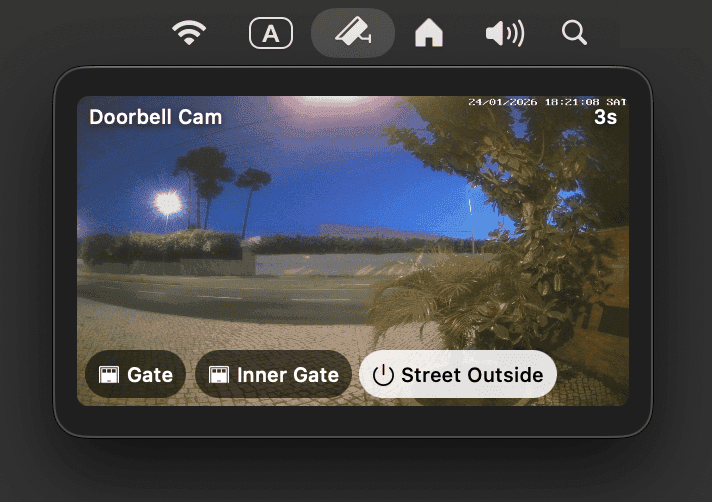
Live camera feeds right in your menu bar. Overlay quick-action buttons for gates, door locks, or lights — a full intercom system without ever opening an app. See who’s at the door, open the gate, and turn on the porch light from a single panel.
Live Preview · Quick Actions · Intercom
Personalisation
Custom icons
Personalize any accessory, scene, or group with your own icons. Choose from thousands of Phosphor icons to make your setup truly yours.
Phosphor Icons · Per-Device Icons · Visual Identity
Automation
Deeplinks
Integrate with Shortcuts, Alfred, and Raycast. Trigger any device or scene via URL schemes from any app that supports custom URLs.
URL Schemes · Shortcuts · Alfred · Raycast
Multi-device
iCloud sync
Sync favourites, hidden items, and keyboard shortcuts across all your Macs automatically. Set up once, use everywhere.
Cross-Mac Sync · Automatic · Zero Config
Hardware
Stream Deck
Control your home from physical buttons. Live device state on each key with icons automatically synced from Itsyhome. Tactile, instant, satisfying.
Physical Buttons · Live State · Icon Sync
Developer tools
Webhooks & CLI
Receive HTTP calls to trigger any device or scene. Connect with IFTTT, Zapier, n8n, or your own scripts. Full command-line control for shell scripts, cron jobs, and automation workflows.
HTTP API · Shell Scripts · n8n · IFTTT
No subscriptions
Purchase once, keep forever · Family Sharing included
Itsyhome Pro is available on the App Store with a one-time purchase. Your purchase will support the future development of the app.
Works with all your devices
Itsyhome supports 18 different HomeKit device types with tailored controls for each.
Lights
On/off, brightness and color
Switches & outlets
Power control
Door locks
Lock and unlock
Thermostats
Temperature and modes
AC units
Climate control
Fans
Power and speed
Blinds
Position and tilt control
Garage doors
Open and close
Security systems
Arm and disarm
Doors
Position control
Windows
Position control
Humidifiers
Humidity control
Air purifiers
Air quality control
Valves
Water flow control
Faucets
Water control
Slats
Tilt angle control
Temperature sensors
Current readings
Humidity sensors
Moisture levels